
A C C R E T E

Top 5 Differences Between Node.js and ASP.NET Features and Performance

In the software industry, developers have many choices to decide which programming language they want to use to develop a web-based software. While some languages will keep coming and going forever, some others have survived the test of time. As a developer, you do not need to participate in a race with a wooden leg; hence it becomes essential to choose a programming language that provides advanced functionality while being versatile at the same time.

Hire Dedicated Web Developer

In this article, we are comparing Node.js and ASP.NET (Core). Both are renowned and publicly available programming languages and provide fast, scalable, robust, and secure development process. Though, respectively language has its own set of advantages and disadvantages that gets better with every release. Therefore, the choice of a programming language will depend on the requirements of the project. For example, ASP.NET (Core) is a limited environment, while Node.js has various tools available without any additional charges.

Both programming languages have some fantastic features that fulfill your project or business requirements. Let us compare both programming languages for a set of features below.

Basic of Node.js vs ASP.NET Core

Developed as an alternative to Server-side scripting in JS, Node.js can work for both frontend and backend development as it is a JavaScript-based programming language and is compatible with all languages based on JavaScript. In addition, there are prewritten codes available in the form of modules within packages that allow you to write code faster and more professionally. There are almost a million packages available in the Node.js library. There is even an automatic lock-file mechanism that allows you to secure new dependencies.

.NET Core is entirely different from Node.js as it is based on the C# programming language and can be used only for .NET projects using languages such as F# or C++. Similar to the Node.js libraries, there are libraries available for .NET Core with prewritten code with support for data structures. These libraries include security, encryption, and database access. For graphics rendering and database connectivity, class libraries are used.

Synchronous & Asynchronous Processing Models: Node.js vs .NET Core

Node.js and .NET Core have entirely different models for processing. Node.js is an asynchronous platform and can handle multiple requests simultaneously without blocking them. Although the code execution is done on the main thread, other parallel threads perform other tasks. This increases the efficiency and speed of processing in Node.js solutions, even if the data set is large.

.NET Core is also an asynchronous platform where each request is processed on a separate thread. Each I/O request does not block the threads. This makes .NET Core one of the fastest web frameworks available across multiple programming languages.

Performance of .NET Core vs Node.js

Having an asynchronous model, solutions built using Node.js have a good performance without being too heavy compared to the other solutions. As per a study conducted by Nodejs.org, almost 50% of the companies realized better app performance after switching to Node.js for their technology platform.

In other studies, it has been originating that .NET Core has a better performance than Node.js. However, this shows that one programming language cannot be considered better than any other, as it all depends on the business requirements.

Reliability, Stability and Security

In these criteria, .NET Core is a clear winner as it is much more secure and reliable, and solutions developed on this platform using C# are robust. However, for complex enterprise software developed using Typescript, Node.js is a more reliable alternative.

Benefits of using .NET Core:

  • It is easy to work with, and as a developer, you will have certain limits that are precise yet flexible if you operate using the correct processes.
  • .NET Core allows developers to create programs using less code and even optimize the code structure, thanks to reduced code lines. In addition, less development time means less expenditure in developing the solution, bringing .NET Core much closer to Node.js when developing speed.
  • Maintenance of large applications built over .NET Code is more effortless than Node.js. .NET Core is a platform-independent language. It allows developers to create microservice applications that are self-sufficient and autonomous.

Benefits of using Node.js:

  • js is a full-stack JavaScript that can be used to develop server-side and client-side applications that are interpreted using the V8 JavaScript engine developed by Google. This engine compiles JS code into machine code which makes the whole process fast and efficient.
  • The runtime environment supports non-blocking I/O operations, which speed up the execution of code.

Platform Support and Stability of Node.js vs ASP.NET Core

.NET Core was a pure Windows-based platform till 2018, after which it was upgraded to run on Linux and macOS. Node.js is platform-independent and is officially supported by Windows, macOS, Linux, IBM AIX, FreeBSD, and SmartOS.

Hire Dedicated Web Developer

When it comes to scalability, both Node.js and .NET Core are highly scalable platforms and fit into the microservices architecture very well. In addition, Node.js is perfect for developing distributed systems.

.NET Core vs Node.js? It will be easier for you to decide the programming language if you know what kind of software or app you want to develop. If you are still unclear, give us a hint and we will consult you to make the best decision based on your project requirements.

Please let us know if anything you want to add any useful content related to Node JS vs .Net performance. If you want to hire .Net Developer or hire NodeJS Developer, please connect with us for a free consultation.
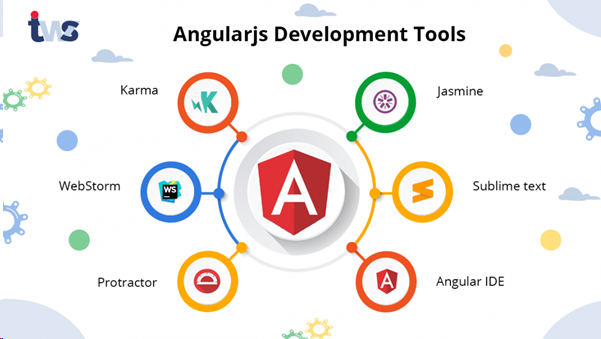

Top 5 Angular JS and React JS tools that developers should use in 2021

As the world is growing fast and moving towards modern technology to reduce human effort, we witness the daily upgrade in the online world. The primary medium in the current era is either websites or social media to interact or communicate with an audience. The development of both mediums comprises several points to initiate its platform. Therefore, developers around the globe stay in keen search to explore the best possible tools or tricks to develop the website most smartly.

Hire Dedicated Web Developer

Developing field comes with people having different expertise levels. Therefore, some developers at beginner and intermediate levels need an update to know what they should use to make their work efficient. Well, no need to worry. We are here to recognize you about the Top 5 Angular JS and React JS tools that developers should use in 2021. The purpose of explaining and highlighting these tools is to the aware developers of the Latest trending pros and benefits.

Let’s Find Out More About Angular JS and React JS


Angular JS is an organizational framework for web apps (dynamic). It enables the usage of HTML to operate template language and allows to make components appear clear on the application. As a result, angular JS makes it easier for a developer to skip extra coding work that can be performed within the browser, and that’s why it considers it an ideal tool for any server technology.

Well, React JS is different from Angular JS. It is a source to develop interfaces for single-page applications. The primary purpose of it is to design a layer of website and or any mobile application. It reduces the time loading issue and makes it simple. It gives the basic framework for any website or application.

Top 5 Tools of Angular JS for Developers


As you know, Angular JS’s usage helps you do the coding systematically and make the appearance of any application prominent comes with multiple tools that the developer should know. Following are the tools that every developer should know.

PROTRACTOR

A protractor is a tool that helps Angular.js web building more accessible and faster. This tool seems the best collaborative partner with Angular JS to build web and app development. It also indicates the stages and mandatory changes needed to be done.

DJANGULAR

It helps you in developing and coding the content in a website. Djangular works on both combinations of Angular and Django and enables you to specify your content as per your requirement. Moreover, it helps you not assign tasks individually as it comes in a group and lets you create a namespace.

JASMINE

Jasmine has become the most famous preference for testing Angular JS packages out of all tools. As it is a behavior-driven development system, Jasmine presents functions to structure your checks and make assertions. In addition, it helps in retaining them nicely documented, which is essential, and Jasmine helps attain this.

MEAN

Mean is taken into consideration as the most valuable and effective tool in Angular JS. It enables to alteration or writes reusable code. This Angular JS device is a mixture of pre-bundled and configured modules, such as Mongoose and Passport.

JS

It is one of the most effortless Angular JS tools. This tool helps developers to gain knowledge from an in-depth library and is an effective framework of Angular.JS. Moreover, it allows you to construct suites and custom cases with its simple service. Therefore, you can have a significant advantage in setting up Mocha.js.

Hire Dedicated Web Developer

Top 5 Best React JS Tools

It includes a group of libraries and equipment that assist you to stay in glide and turn your productivity. The react tools supply various alternatives to select from that best suit your project. React JS components implement a shipping technique that takes input statistics and allows its display. Let’s go through and analyze each of them:

REACTIDE

For net software development, Reactide is considered the very first IDE. This pass-platform application ensures simplicity, like beginning a single React JSX file to deliver the react file in the browser immediately. Moreover, due to its live-representation architecture, it secures visual editing support of the current file.

REACT COSMOS

It is a laser-focused tool committed to intensifying all the small and large additives in react development. It examinations the components and allows you to deliver additives with any context, state, and props. In addition, it will enable you to have an overview of how applications develop when connected with various appliances.

EVERGREEN

One of the open-source JavaScript frameworks is Evergreen. It promotes growing structures, which expect new as well as converting design desires. Moreover, it has a straightforward implementation providing complete authority whenever required. Thus, it stays as the strong choice for apps that ought to seem excellent.

BIT

The bit tool makes your components appear clear and visible. It supports groups to allow in addition to managing code additives throughout tasks. This tool has easy extension and integration that lets you reuse unique additives of your tasks with the usage of yarn and npm thru its element hub. With its simple learn and pick components, it becomes easier to maintain and improve faster cycles.

CODESANDBOX

CodeSandbox has excellent search and development ability as it is a well-known online code editor. This react tool automates duties like bundling and management and enables you to create a new task with fewer clicks. In addition, it has a live collaboration feature that permits you to expose your initiatives to others by simply truly sharing its URL. You may, without difficulty, find out how a library is operating and share it as well with the help of this platform.

Conclusion

Now you can easily understand and boost your developing sense by tracing the true meaning of these tools. The purpose of distinguishing the Angular JS and React JS tools is to elaborate the use of tools base on their different usage and needs in development. Therefore, these tools help developers save time and let them know more about trending tools in the current time.

Please suggest to us any tools you need to add to the above list from our contact us section. If you are looking to hire Angular JS Developers or React JS Developers, please contact us.

Complete Guide On How To Develop An MVP For Your Startup!

No matter which business sector you belong to, the uncertainty of the success of a product yet to be launched in the market always tags along. Bringing your vision to life is an overwhelming feeling, but business doesn’t only run on feelings. And thus, to get a better idea of how the product will perform in the market, it is best to build MVP, especially if you are running a startup. For example, if you have an app idea in your mind, you should first create an MVP app. It will help you get an improved idea about the feasibility and scope of that app and provide you with enough data that can help you improve the current version of the app if there is any.

Hire Dedicated Web Developer

Before jumping on how much it will cost to develop an MVP for your startup, first, you need to know whether you need an MVP for your startup or not.

Why Does a Startup Need an MVP?


  • Cheaper and wiser than building a product in one go.
  • It makes way for the product to enter the market with a bang when launching the final product.
  • It helps collect data and feedback that can be used to bring improvement in the original version of the product.
  • Last but not least, it reduces the business risk associated with launching the actual product in the market.

Once you tick on all the reasons mentioned above to build an MVP for your product, next comes the question as to how much it will cost you to create an MVP?

If you have already started looking for an agency or freelancers to work on your MVP development, then you must have come across a band of the price that they quote for the same work. Sometimes, the disparity in the prices gets so huge that it makes the customer question whether they are getting their hands on the right services or not. Some vendors also try to sell prototypes instead of MVP, and thus, they easily quote a low price for this service. On the one hand, where MVP can help you envision the success of your product in the market, on the other, a prototype can only offer genuine feedback from the audience.

For obvious reasons, a freelancer would charge you less for developing MVP, somewhere around five to fifteen thousand dollars. In comparison, a professional company can easily stretch the development cost to twenty-five or thirty thousand dollars.

The precise cost depends on the scope of the work required with the project. For example, a basic model of a mobile app MVP, i.e., user-engaging and straightforward MVP, will cost less, but adding customized gestures, transitions, and buttons will cost you a lot more. Remember, beauty comes with a price! And thus, to make your MVP more eye-catching and customized, you will have to pay the upper limit of the expected cost.

What Are Your Possible Options for MVP Developers for Your Startup?

Hiring a Freelancer

Hiring a freelancer is the most opted choice among startup owners as it is the cheapest and quickest way to work on a project. Although, you may face a lack of obligations by the developer toward your project. They can free themselves from the project in the middle of it or when things don’t work in their favor. Make definite to do a background check on the freelancer MVP developer before hiring them for your project.

Hiring a freelancer may cost you somewhere between five to seven thousand dollars per month. And to make sure that everything goes on smoothly, it is best to hire a designer and a tester, which will cost you around five to seven thousand dollars per month.

So, the overall expense will not be more than twelve or thirteen thousand dollars, which is an affordable range for many startup owners.

An In-house Team

The best but expensive option for hiring MVP developers for your business is to build an in-house team of experts. This ensures that the team is more dedicated to a single project that is yours. However, hiring professionals for an in-house team means you will have to pay them a full-time salary, and thus it may burn a hole in your pocket if you are limited on budget.

But if you are ready to invest more to achieve the best quality results, an In-house team is the most suitable option. As to the question of how much it will cost, let’s take a quick look!

You Will Need The Following Professionals in Your Team:

  • A full-stack developer will cost you a minimum of eight thousand dollars per month.
  • A project manager for around seven or eight thousand dollars per month
  • For a designer, you may have to pay three to four thousand dollars per month
  • And a tester for around the same salary amount as the designer.

Overall, you may end up paying twenty-five to thirty thousand dollars per month or more, depending on the nature of the job you require from them.

Outsourced MVP Developers

Outsourced MVP developers are on quite a high rise in demands these days as it offers you a professional solution at a much cheaper cost. However, an essential task for you as a startup owner is to look out for a trusted and reliable agency. Make sure to go through the company’s website, testimonials, feedbacks, previous projects data and compare them with other potential agency options available to you before hiring one for your startup. This will help you easily overcome the challenges of hiring outsource MVP developers, i.e., building trust and team involvement.

Hire Dedicated Web Developer

Hiring an outsource MVP developer may cost you around fifteen to twenty-five thousand dollars per month.

Although the cost will come across around the estimated price with different options of hiring MVP developer for your startup, it may also vary depending on the type of team you want to create, or the level of expertise you are looking for, as well as the location and hourly rate of the professionals. But it is advisable to go with a professional MVP development agency if you want to build a quality product.

We always suggest entrepreneurs if you have any idea, please go for MVP to validate it. Our MVP agile development process can grow your idea to a commercial-grade product. Let’s start with a coffee to discuss your idea!!

Impact of UI/UX Design: How It Can Help To Grow the Business

Someone has rightly said,

“What you see is what you believe” – The entire design concept revolves around this quote. Truly, UI/UX is the heart of product development.

Hire Dedicated Web Developer

Do you know why?

Statistics by Tandfonline says it takes about 50 milliseconds (that’s 0.05 seconds) for users to form an opinion about your website that determines whether they like your site or not, whether they’ll stay or leave.

Impact of UI UX Design


What Does This Mean?

Most of the users will leave the website in just a few seconds if that doesn’t interest them.

Here comes the role of UI/UX!

The poor UI/UX is one of the sole reasons, why people abandon or stop engaging with your website or mobile app. Good UI and UX of-course holds them back for a longer time and increases the conversion and engagement ratio. It’s one of the crucial aspects of the business which has the potential to make or break the brand. Reliable UI and UX means, design enhancement and customer satisfaction. Grab the attention of the users which ultimately helps in increasing the user-base. Investing in app’s or website’s UI/UX has the potential to increase ROI.

If you hire a web designer, they will add a distinct look and feel to your website or mobile app to get magnificent results.

Here is why good UI/UX is essential for business.

  • Great UI and UX attracts and retain customers

In this competitive environment, high-quality UI/UX can help you to stand out from the crowd. The best UI/UX design is which understand the user’s perspective and provides the best look and feel.  It is well-said “First impression is the last impression”. To make your users impress at first-go, your app must be aesthetically designed and all the elements must be well-placed keeping in-line with color-palates. If you hire a web designer, they can brilliantly design your mobile app or website, provide easy-navigation which rarely makes the user click on the back button.

  • Builds Brand Identity

Just like you own your identity; brand identity is something that sets your product apart from other businesses. Brand Identity is usually simple, clear, and clean, and visually appealing; it communicates about your product’s identity. Without a doubt, it is its UI that makes your brand identity outstanding. When you have a great design, you build your reputation and when you build your reputation, you set the benchmark of customer’s expectation. Thus, ultimately you increase the chance of having more customers. Happy and satisfied customers increase brand credibility and result in increased sales.

  • Saves Time and Money

If you are a small business owner, you might hire a naïve designer who might not have enough knowledge in designing and might not design exactly the way you want. If you hire a dedicated UI/UX designer, there are minimal chances of any issues with your application or website. A perfect product will have zero to no issues and might not need frequent upgrades. This results in saving time and money which you may spend high on hiring the naïve designer.

  • Get More Traffic on a great UI/UX

Without a doubt, a good UI/UX increases traffic and enhances customer satisfaction. If your website is brilliantly designed and they can find the relevant content on your website, nothing can stop users from navigating further and increase conversions. The longer your visitor will stay on the website, the lower your bounce rate will become. Adding social sharing buttons on your website will help to promote your website which in turn will increase visitors, traffic, and engagement ratio.

  • Maximized Revenue

Quality is always the priority for customers. If you provide your customers what they need, you will surely yield a good profit. Fulfilling customers need and business demand directly impact the revenue, brand value and of-course lead to the increase in ROI. Having an effective design increases product sales builds loyalty, opens new avenues, and reduces the time-of-market. All these benefits lead to more profit and an increased revenue stream.

Hire Dedicated Web Developer

What Are Your Thoughts? Are You Investing in The UI and UX of The Business?

Whether you are a start-up or enterprise, investing in UI/UX can help to grow your business. Through research on what makes the app attractive and more engaging can win the hearts of your customers. If you understand the target audience and their preferences, you are all set to design an app that can fulfil your customer’s needs. The goal is to provide an easy solution to the complicated problem.

If you hire a dedicated web designer, they can provide you a beautiful, engaging business solution. They can create a user-centric design that can increase customer satisfaction and customer retention.

On a brighter note, UI/UX plays a key role in the success and lead conversion of business. Without a doubt, it can convert your dream website into reality. So, choose the best strategy, hire the best UI/UX designer and give an edge to your competitors.

Laravel vs. CodeIgniter: PHP Framework Comparison

PHP is an open-source scripting language widely used for developing websites and applications. Being one of the best PHP software development companies, we are frequently asked about the most used and user-friendly frameworks for web development in our company. Our PHP consultants have expertise in all PHP frameworks but, Laravel and CodeIgniter are loved by our PHP developers.

Hire Dedicated Web Developer

So, this blog will address the two trendiest PHP frameworks –Laravel and CodeIgniter which have been rising high in usage and popularity across the globe. We will try to address Laravel vs Codeigniter as well. Both are open-source frameworks and can build a secure, complex web application and both provide great results in web development. You need to consider several aspects before choosing the one.

Let’s check out what is Laravel and CodeIgniter? And what is in the plate when it comes to Laravel vs Codeigniter?

What is Laravel?

Laravel is a free open-source PHP framework that has inbuilt features for making web application development easier and faster. As it has a variety of compatible packages and extensions, software developers are adopting this framework for a streamlined development process. It is a reliable framework as it is expressive and follows accurate language rules. It supports MVC for development and is written in PHP.

Key Features of Laravel:

• Reusable Code
• Frequent Updates
• Clear Modular Structure
• Great Software tools
• Elaborate Integration Mechanism
• Faster Database Access
• Improved Performance
• Powerful Online Community
• Lots of libraries and modules
• Offers Authentication
• Smooth Migration
• Easy Unit Testing
• High-End Security

What is CodeIgniter?

CodeIgniter is an open-source powerful PHP framework used for developing PHP websites. It is free, easy-to-use, and offers a ready-to-use library. It is simple and provides easy to use tool for developing dynamic applications fast and efficiently. Moreover, it enables the addition of third-party plugins for implementing complex functionalities. Apart from superior stability, security and support, it provides clear and structured documentation and assists you with enhanced performance.

Key Features of CodeIgniter:

• Free to use
• Follows MVC pattern
• Lightweight
• Generates SEO friendly URLs
• Enables easier tweaking of database
• Data transfer without any error
• High-level efficiency
• Validation
• Great community support
• Easy and hassle-free migration
• Light in weight

Laravel vs. CodeIgniter: In-Depth Comparison

Laravel CodeIgniter
Database Model Object-Oriented Relational Object-Oriented
Programming Paradigm Event-Driven Functional Component Driven
Routing Explicit Routing Supports both Explicit and Implicit
Built-in Modules Divides project into small modules and can be reused Doesn’t support built-in modules
Support for RESTful API Provides APIs without spending extra time Doesn’t provide a streamlined approach for REST APIs
Template Language Blade Template Engine PHP Proprietary
Learning Curve Difficult to learn for beginners Easy to learn
Companies using 9GAG, Union Buffer, Manchester
Structure and Updates Follows MVC structure and comes with the command line argument called Artisan The structure is MVC and loosely based on object-oriented programming
Template Engine  It comes with a robust template engine called Blade Code-Igniter doesn’t have any built-in template engine
Libraries It has its official document It has lots of built-in functionality.


The Popularity of Laravel vs. CodeIgniter

Google Trends: Laravel vs. CodeIgniter


With the interest over time, the Laravel PHP framework is on the brighter side compared to CodeIgniter.

Laravel vs CodeIgniter

Statistics

• According to Builtwithtrends, there are around 1,232,451 websites developed in Laravel.
• According to Builtwithtrends, there are around 1,410,088 websites developed in Code Igniter

GitHub Stars

• Laravel has 64.1k stars and 20.5 k Forks on Github
• Code Igniter has 18.1k stars and 7.8k Forks on Github.

When to use Laravel and CodeIgniter?

Laravel

Laravel scores better compared to other PHP frameworks. It is not only used to build websites but also web apps which is based on MVC architecture and object-oriented programming. From a one-page website to a social network website, you can develop any type of simple to complex website in Laravel. Some of the project requirement includes:-

• ORM/PDO
• Template Engine
• RESTful API
• Logging
• Mail
• Database Management

Code-Igniter

CodeIgniter is a toolkit to build applications rapidly in a PHP framework.

• CodeIgniter is a good option to develop large and small application both.
• If you are looking to create a business web application, then CodeIgniter is the best option.
• If you want to develop a small website and want to have clear documentation, then even CodeIgniter is the best option.
• If you have little knowledge about technical aspects, choose CodeIgniter

You can use pre-existing components such as email, session management, and database management to embed basic functions into your customizable application. Websites developed using CodeIgniter load faster and occupy less space compared to other frameworks.

Hire Dedicated Web Developer

Laravel vs. CodeIgniter: Which is better?

Laravel and CodeIgniter both are the best PHP frameworks for web development. Choosing the one depends on your requirements, budget, size of the company, and many other factors. Laravel is loved by developers due to its coding patterns and robust application development in no time. However, learning Laravel is a bit tough compared to CodeIgniter. CodeIgniter is easy to grasp and best for projects which don’t require additional features.

If you have still any doubt on which framework is better for your web application? You can connect with our PHP consultants who have a great level of expertise in developing the custom PHP application as per your requirements. Accrete is one of the top PHP software development companies providing diverse solutions and services across the globe. With efficient project management practices and flexible engagement models, we strive hard to provide customer satisfaction.

Using a Redis object cache for WordPress

Using a Redis object cache for WordPress is a great way to make your WordPress website faster, especially if you’ve already gone through the “Making WordPress Fly” series of tutorials (noted that one commenter there actually mentioned Redis). You’ll need an Ubuntu 14.04 VPS with WordPress already setup on it. You can get an Ubuntu VM here if you don’t have one. You don’t have to use the aforementioned HHVM setup for this tutorial. However, using both HHVM and Redis object caching will give you the fastest load times. I will be releasing another article in the near future about improving HHVM stability for production deployments by using a PHP-FPM failover and an upstart script which does automatic respawning after a crash, something HHVM does not do by default on Ubuntu. Back to Redis – Redis is possibly the best way at present to implement the WordPress object cache. For a long time I have been a proponent of either APC or Memcached in combination W3 Total Cache for the object cache in WP.

WHY USE A REDIS OBJECT CACHE FOR WORDPRESS?

During a recent server setup for a new website (My French City) I came across an issue. Caching using APC or Memcached helped with front end speed, but the admin area was painfully slow. This site was a multisite install with domain mapping and hundreds of plugins. There were simply too many queries going on in the backend for it to be snappy. After some searching I discovered that implementing Redis to back the WordPress object cache was a great way to improve backend speed. After implementation it turned out it did a better job on the frontend then W3TC and Memcached, which was a pleasant surprise. HHVM does a great job of speeding up PHP and MariaDB 10.1 is also fast. But on a heavy site like this with lots of plugins, database queries are still the issue. Redis is an elegant NoSQL datastore solution to this problem.

A Redis object cache can be implemented in just a few commands on Ubuntu 14.04. Assuming you already have a working WordPress install (LAMP, LEMP , etc.) the process of getting redis working with WordPress is easy. First connect you your instance via SSH. Once connected:

Now Redis is installed. To configure a Redis object cache for WordPress there are a few small changes we need to make. Open up /etc/redis/redis.conf then add these two lines at the bottom:

Now you’ll need to make some changes to WordPress. You’ll need to grab this file. Written by Eric Mann this file will allow WordPress to use a Redis object cache for awesome speed improvements. Once you’ve downloaded that file, make sure you disable W3TC object and database cache if you are using either. Now that Redis is running (and PHP knows how to connect to it), it’s time to tell WordPress to use our Redis object cache. You need to open wp-config.php and let WordPress know what host and port Redis runs on, and add a salt to keys. Add these lines:

Then place the file in you downloaded above in webroot/wp-content/object-cache.php, where webroot is the directory your website files are located within. Once this is done make sure the redis-server is running using sudo service redisserver status . Now you WordPress site is using a Redis object cache. You should notice significant speed gains once you click through a few pages and the cache is populated with queries. If you want to view the Redis console to see what kind of data is being stored run this command: sudo rediscli monitor . That will show you a verbose look at what is going on in your Redis cache.

Unfortunately I do not have a control before and after for the speed difference. However here is a Pingdom load test of a page on this website:

I will be writing more about this in the future. Please leave your thoughts or any contributions in the comments below. At that time I may include more detailed information on the performance gains achieved using Redis object cache with WordPress.

Find an agent now

Telephone

+917041046049

Time Schedule

Office Time

Mon - Fri: 9:00 - 18:00